
Dynamic Live Stream Templates
Simplify live streaming through Rally Cry’s tournament software, featuring dynamic, customizable templates that empower streamers of all experience levels to broadcast and build community.

Role
UI/UX Designer
UX Researcher
Motion and Broadcast Designer
Design QA
Timeline
Oct 2023 - Feb 2024
(5 months)
Tools
Figma
Team
Solo Designer
Front and Back-end Engineers
Product Manager
| Overview
Rally Cry creates mobile and desktop software that enables clients to host public or private video game tournaments.
As the design lead, I spearheaded UI/UX for the entire platform—designing 25+ new features for 239k users using a Design System and research practices I established in collaboration with Product, Engineering, and Business teams.
| Problem
A large part of the video game community is found in livestreaming. As such, our clients wanted to foster community in these tournaments by encouraging players to livestream.
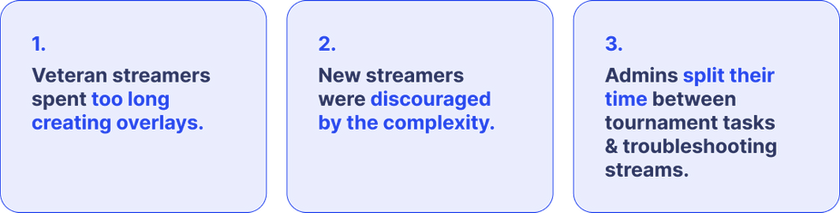
But it can be intimidating and time-consuming. From creating overlays to mastering complex software like OBS, beginners are often discouraged and veterans overwhelmed by logistics. As a result, fewer players stream Rally Cry tournaments, which limits community growth and engagement.
Few players streamed tournaments, and those who did often had issues that pulled admins away from running the events to troubleshooting streams.
| Goals

| Solution
Dynamic Live Stream Templates removes barriers to live streaming by simplifying one of the most time-consuming parts of the process: overlay creation. It eliminates the need to create assets or manage individual data pieces.

| Impact

Overlays are visuals that sit on top of a streamers live video feed.
They could be borders, chat boxes, alerts, or other graphics that display pertinent information. Think of layers in Figma or Adobe, you can layer overlays with each other.

Research | Qualitative Interviews Uncover Pain Points
I gathered insights through interviews with three external streamers of varying experience levels and three internal tournament admins. Streamers shared that creating overlays could take up to a week, and many cited setup as their biggest barrier to streaming.
Over several months of conversations with our internal admin team, I learned that streamer setup issues were a major pain point, often pulling admins away from critical tournament operations to provide troubleshooting support.
Research | Studying Existing UX Patterns and Competitive Analysis
I analyzed Twitch, the leading esports streaming platform, and OBS to identify familiar UX patterns for streamers. I also reviewed common patterns in administration and creation dashboards to explore how these could integrate with Rally Cry’s Design System.
These insights guided scalable design decisions aligned with Rally Cry’s stretch goal of expanding streaming services. While we initially featured only official tournament streams, our long-term vision was to showcase all tournament-related streams and encourage more players to broadcast.

Twitch is a streaming platform where users can watch and broadcast content, primarily focused on video games.
The platform excels at fostering community by surfacing relevant streams based on viewer activity and subscriptions. It also supports new streamers through free resources like templates and overlays, and incentivizes creators with payout programs.

OBS is a software used to record and live stream media from sources such as webcams, screens, and microphones.
It comes with a steep learning curve. Studying the platform helped contextualize many of the challenges mentioned in interviews, deepening my understanding of streamer workflows and the logistics of going live while revealing patterns to avoid.
Combining these insights with feedback from both external clients and internal team members, I identified that the most effective way to enable live asset updates was by providing streamers with URLs to plug directly into their preferred streaming software.
Research | Identifying Constraints
My stakeholders and I identified business constraints at the beginning of the design process. I went back to engineering, operations, and administration teams each round of designs to gather feedback, where new technical constraints were often identified.

Phase 1 | General Templates Using Existing Patterns in Design System
My initial designs introduced an entry point on an existing resource page, where users could access pre-made templates and either copy and paste the URLs into their streaming software or download the PNG files. I primarily used existing components to minimize engineering effort.


Conversations with our admins revealed this wasn’t granular enough
Interviews with our Operations and Tournament Administration teams revealed that the initial solution lacked sufficient customization. With the nuances of different tournament formats, a one-size-fits-all approach wasn’t flexible enough.
This round of design exploration clarified that our goal extended beyond offering generic backgrounds, logos, and templates. We wanted to generate streaming assets that reflected tournament-specific details such as brackets, matches, and prizing by pre-populating templates with dynamic data.
Phase 2 | Pivot for Scope Change and Optimize Site Architecture
Our expansion in scope led to more tournament-specific streaming templates, which prompted me to create more entry points and a different approach.


Fine-tuning components
The customization modal allowed users to configure the information in a template.
In Option 1, users clicked directly on the graphic to edit it. While this leveraged desktop screen space, it was quickly retired due to technical and resource constraints.
Options 1 through 5 explored our existing modal pattern. The general modal was being redesigned simultaneously, so we experimented with the placement of the trash and expand icons. After team discussion, we settled on Option 5: the trash action applies broadly, while expanding an image or content is specific to that content within the modal.

Research | User Testing
I tested a prototype with one beginner, one intermediate, and one professional streamer, asking them to complete simple tasks. Findings showed that the experience was largely intuitive and easy to use for all participants.

During the design phase, I collaborated with our Operations team to create a step-by-step resource article for using this feature. While the ideal experience would be entirely intuitive, some streamers needed guidance with complex streaming software. Feedback indicated that this resource should be more visible, so we added an information tooltip next to the header, directing users to the article.
| Solution
3 months? Give me 3 minutes. Rally Cry's Streamer Kit removes barriers to live-streaming by simplifying one of the most time-consuming parts of the process. No more time sinks in asset creation and managing individual pieces of data. Instead, take 2 minutes to customize a template, then paste the URL into your streaming software.

Customize your overlay
Configure the content displayed in your overlay

Copy and Paste the URL
Download overlays or copy the URL. Scenes with dynamic content won't have the outdated data downloaded in the .PNG. Simply paste this into your streaming software of choice.
Go live!
Once you've set up all scenes, you're ready to go live! If this is the tournament stream, highlight it for all to see.

| Impact

| Key Takeaway
Thorough research, preparation, and communication aids in saving resources. Effective communication with stakeholders enabled efficient workflows, and ensured a sharp pivot in scope didn’t shatter our timelines. Flexibility and preparation go hand-in-hand in agile team collaboration.